

I’ve been creating & delivering presentations using AAC with groups and at conferences since I was 12. It is a great way to share your thoughts, opinions, dreams and needs. There are so many different opportunities these days to do a presentation. Often in primary school, children start sharing work this way, and this continues throughout school. It is definitely something a young person with an EHCP or IEP could use for transition meetings to show they have thought about their own needs. I view creating and delivering presentations as an AAC user as an essential life skill. More recently, since COVID, I’ve been creating and delivering presentations, training, webinars and other materials for virtual delivery.
The content has been diverse; sharing my lived experiences, an academic project, my research, training for other AAC users, training around AAC for professionals and sometimes just about life. Mostly this has been on my own and sometimes in collaboration with others. You can find out more about my work here.
Key considerations for creating and delivering presentations
Along the way, I’ve learned a lot by observing other presenters. I’ve also done my own research on what makes a good presentation. After every session, I ask for feedback and reflect on how it went and what I might improve or change next time.
There are 6 key stages to consider, besides reflection:
- Planning and preparation
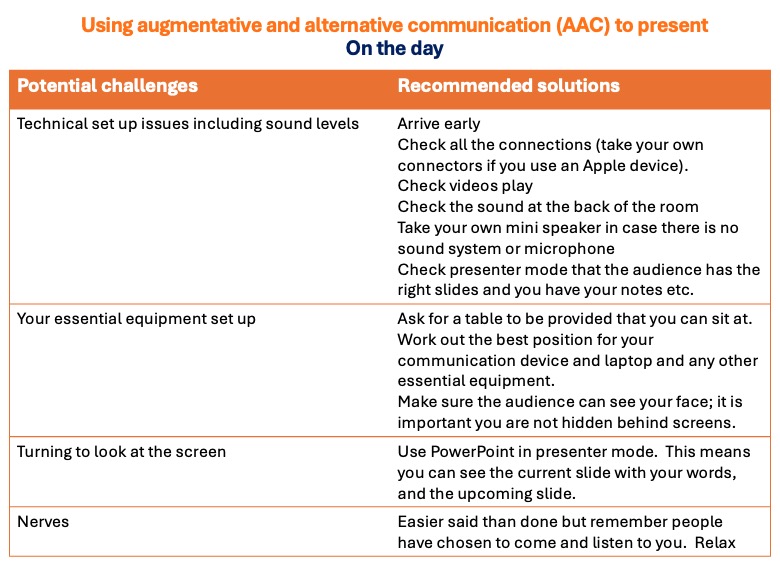
- Preparing your actual slides and words
- The run-through
- On the day set up
- Engaging with the audience
- Handling a Q&A session.
Planning and preparation
Planning and preparing a presentation
Each of us is different, and there is no right or wrong way to plan and prepare for a presentation. As a visual thinker, I see the presentation and its flow in my mind. So, for me, the logical approach is to prepare a PowerPoint first and then add the words I’m going to deliver afterwards. Other people might want to prepare the words and then use a PowerPoint to emphasise the points they are making.
Remember you will need extra time to get your message across when using AAC to present
My advice is to ensure you have enough time allocated to deliver your message. I had written into my University support plan that I needed 100% extra time to present and double the number of slides allocated to other students. For instance, if another student is given 5 minutes to present 5 slides, I get 10 minutes and 10 slides.
The rationale for extra time and slides is that natural speech is around 160-180wpm (and faster if the presenter is nervous), so in 5 minutes others would deliver around 800 words of content. Because pre-programmed speech is output from my device at 80-100 words per minute, I need extra time to deliver a similar level of content, work my tech and use the extra slides to ensure engagement with the audience. This wasn’t a difficult ask as I already got 100% extra time for my coursework. In group presentations, lecturers always made sure other students understood that this extra time and the supplementary slides were only for me.
As you prepare, also think about your audience’s needs, how much you want to say and how much time you have. It can be easy to cram too much onto a slide and speak too fast (for everyone), so think through the options below to work out your best approach.
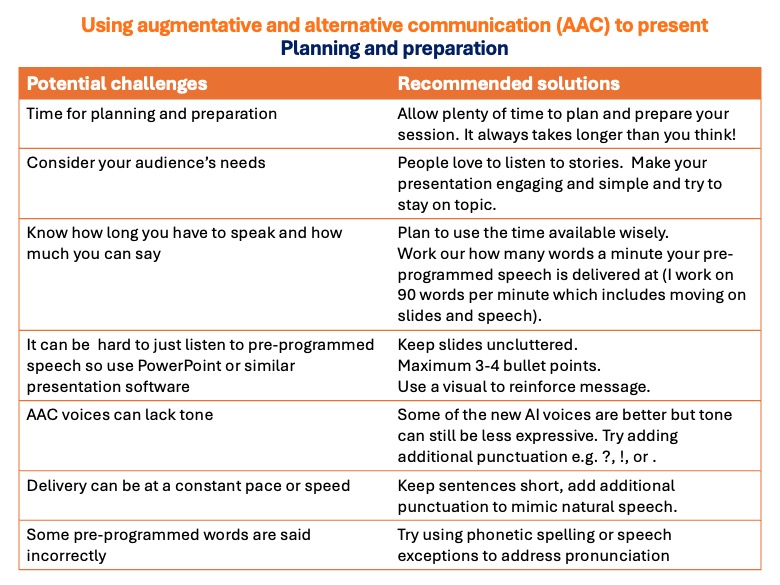 Considerations for AAC users
Being an AAC speaker brings some additional challenges to consider and prepare for. A few things I consider when planning include what to put on your slides and why, and what you might say and how.
Considering your visual content to complement your spoken words. I always want my presentations to engage my audience as fully as possible. As a visual learner and thinker, I like to use PowerPoint to support what I’m saying. The added benefit is that adding videos or music lets me break things up a bit. When someone isn’t used to listening to an electronic voice, they can find the cognitive load quite high, especially if the delivery is too fast.
Here are some of the things I think about when preparing a PowerPoint and visual support.
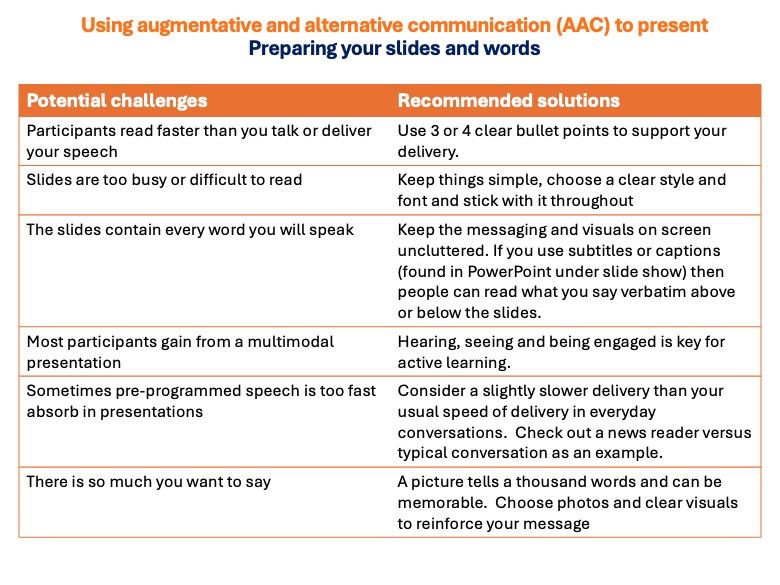 Preparation is key: always do a run-through
So you think you are ready; now is the time to check and double-check. You want to be in control on the day. Use this opportunity to check the flow, ease of understanding, that your videos work, and how to turn on subtitles and other accessibility options. Also make sure that you have notes on the presentation to support your delivery on the day.
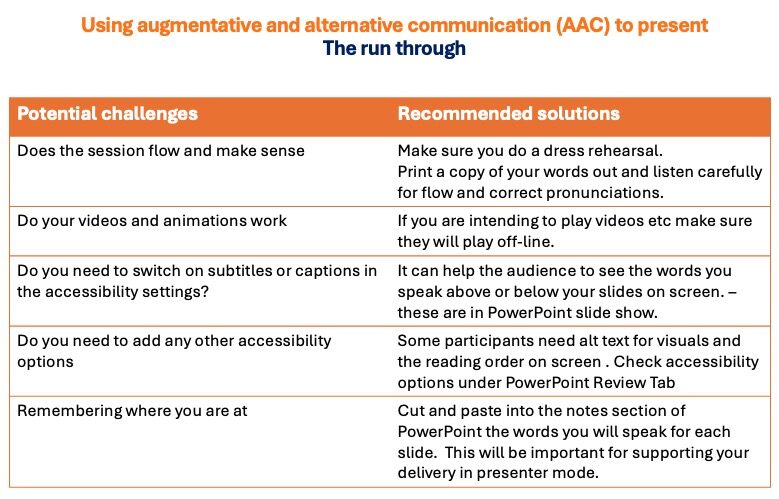
On the day
Always arrive early and do your pre-session checks to make sure everything runs smoothly. Check the technical set-up and sound levels. Then make sure your equipment layout works best for you so you can avoid turning around to look at the screen whilst presenting. Once that’s done, you can try to relax.
Find ways to relax when delivering your presentation
Remember, one of the best things about using AAC is that whilst you might be nervous your voice will not have the nervous ‘wobble’ presenters using natural speech sometimes display.
Here are a few things I’ve picked up from observing other presenters from all walks of life. The very first time I presented, I was very nervous. When I’m nervous, my body tightens, and activating speech buttons and slides is harder. After discussing this with my Mum, we came up with some visual imagery which makes me smile. I imagine that, as I look around the room, my audience are all bobbing up and down in a swimming pool, wearing banana-skin swimsuits. Since some people I know are usually present, I focus my visualisations on them. The images running through my head just make me smile; this makes me relax, and then any ‘stiffness’ in my body, which affects my gross and fine motor movements, disappears.
Engaging with your audience
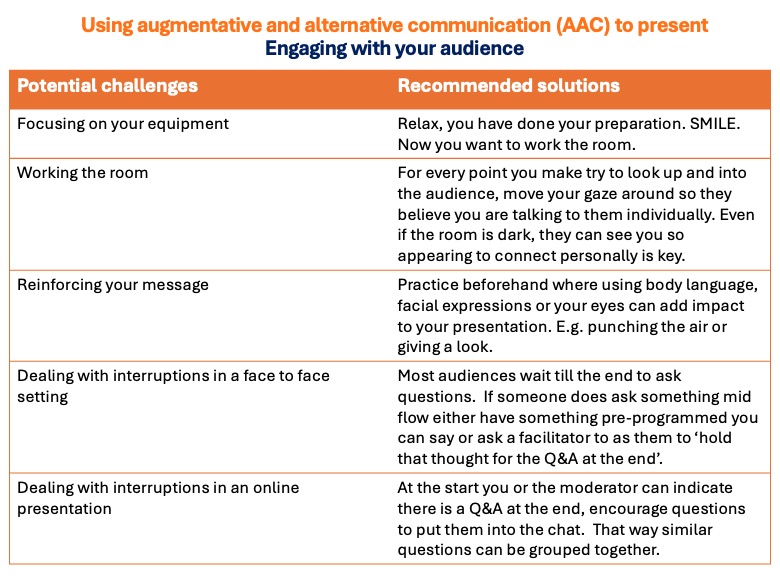
Remember to smile; people are there because they want to hear what you have to say. Try not to just focus on the screen; work that room! Try to look up and around; practice using body language, facial expressions and eye movements to reinforce points. And spend some time beforehand thinking of what happens if you get interrupted.
Planning for a Q&A
Having a live question and answer session can be both daunting, and can take a lot of time if you are spontaneously responding to questions from your audience.
Here are a few techniques I’ve used to try and address this. These include considering how to react to questions, irrelevant questions, and too many questions for the time available. Importantly, consider how long it takes you to answer a question spontaneously and keep your answers to the point.
If you get the chance to present, give it a try
Each time I present, I get the same thrill. As someone who relies on AAC, I sometimes find it challenging to be heard, but having the opportunity to share my work, thoughts, and opinions with people who want to listen is empowering. Good luck creating and delivering presentations using AAC.
If you found this interesting or
helpful please feel free to share.